
Self Hosted - Linux Homeserver Infrastructure
Self-hosted infrastructure running 24/7 on Debian with Docker, Cloudflare tunnels, and proper security hardening
The Setup
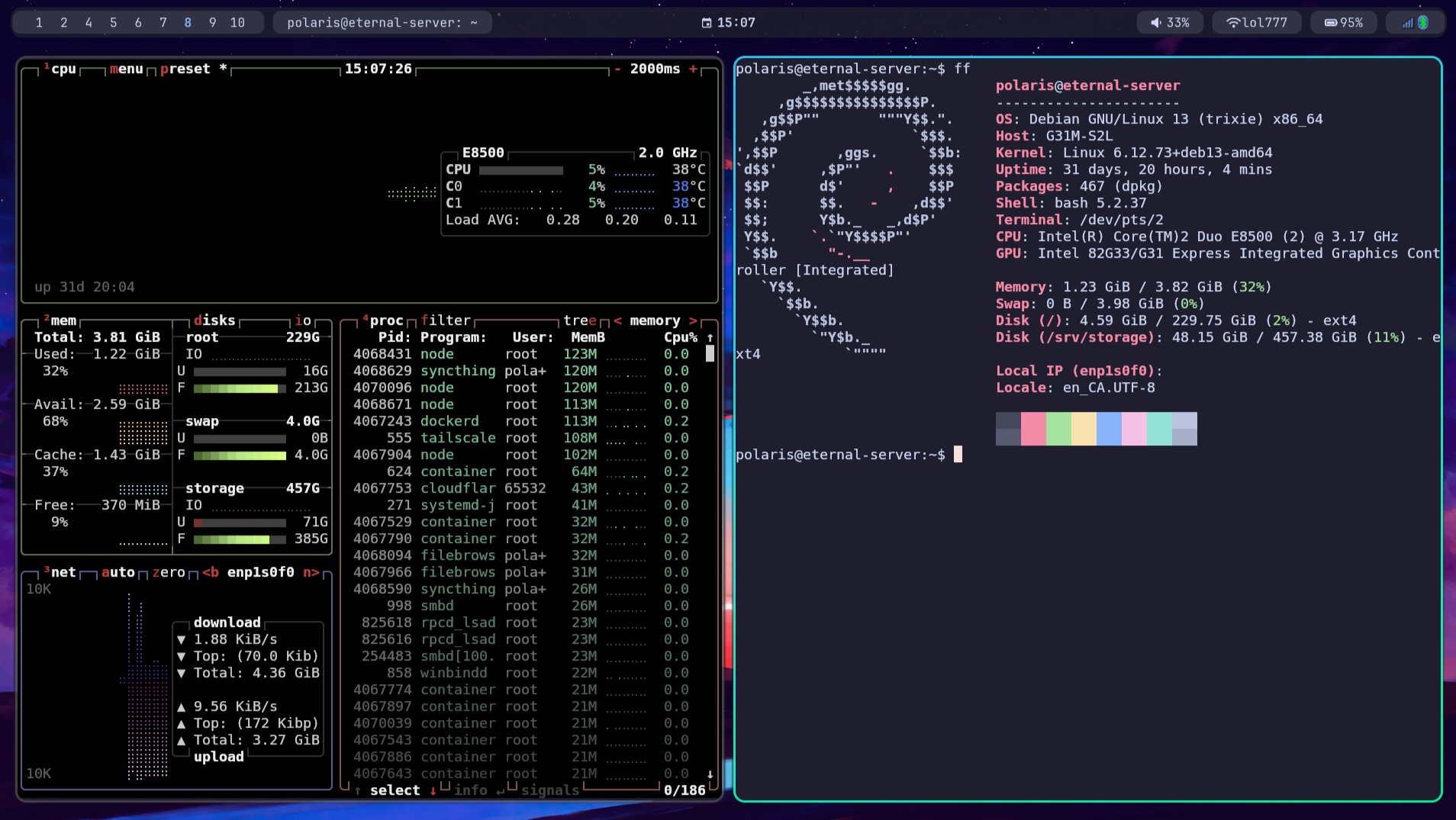
A self-hosted server running 24/7 on Debian Stable. Old hardware—Core 2 Duo E8500, 4GB RAM, a couple hundred gigs of storage—but it handles everything I throw at it.
The server runs headless. No monitor, no desktop environment, just SSH access and web interfaces. All management happens remotely.
Design Choices
Why Debian Stable? When something runs 24/7, you want boring. Debian Stable's packages are old but tested. Updates don't break things at 3am. Arch is great on my desktop where I want the latest everything—on a server, I want reliability. Debian's release cycle means I upgrade once every few years, not constantly.
Why Docker? Isolation and reproducibility. Each service runs in its own container with explicit dependencies. No conflicts between services wanting different versions of the same library. If something breaks, nuke the container and rebuild from the image. The compose file is the documentation—it defines exactly what's running and how it's configured.
Why not bare metal services? Tried it. Package management becomes a nightmare when you have 10+ services with conflicting dependencies. Containers let me run whatever versions each service needs without polluting the host system. Upgrades are trivial—pull new image, recreate container, done.
Why old hardware? It's what I had. But also: constraints force efficiency. When you only have 4GB RAM, you learn to pick lightweight alternatives, avoid bloated images, and actually think about resource usage. Most services idle at near-zero CPU. Memory stays under 50%. The E8500 handles it fine.
The Two Stacks
Services split into two access patterns: public and private. Different security models, different routing, same Docker infrastructure underneath.
Public Stack (Cloudflare Tunnel)
For services that need internet access—like this portfolio website.
Why Cloudflare Tunnel over port forwarding? Traditional setup: open ports on router, set up dynamic DNS, manage SSL certificates, hope your ISP doesn't block ports or change your IP. Cloudflare Tunnel: outbound connection only, no ports open, home IP hidden, SSL handled automatically, DDoS protection included. The tunnel daemon connects out to Cloudflare—nothing needs to be open inbound.
The request flow:
1. DNS query hits Cloudflare (records managed in their dashboard)
2. Cloudflare routes through their network to my cloudflared daemon
3. cloudflared forwards to Nginx reverse proxy inside Docker
4. Nginx routes to the appropriate container based on hostname
5. Response flows back through the same chain
Why Nginx between Cloudflare and containers? Could skip it—cloudflared can route directly to containers. But Nginx gives me one place to manage routing rules, add headers, handle caching, configure rate limiting. If I add a new service, I update Nginx config, not Cloudflare tunnel config. Separation of concerns.
Nginx and public containers share a Docker bridge network. Containers expose ports only to that network, never to the host. A container compromise can't directly reach the host or other networks.
Private Stack (Tailscale)
For services that should never touch the public internet.
Why Tailscale over traditional VPN? OpenVPN or WireGuard manually configured means managing keys, dealing with NAT, setting up a VPN server, opening ports. Tailscale is WireGuard underneath but handles all the coordination. NAT traversal just works. My laptop, phone, and server join the same mesh network. From anywhere, I access internal services like I'm on the home network.
The server gets a stable Tailscale IP (100.x.x.x range). MagicDNS gives hostnames. I access Syncthing, Filebrowser, SSH—all through the tailnet. No port forwarding, no dynamic DNS, no exposed services.
Private services run on a separate Docker network, completely isolated from the public stack. Not connected to Nginx. Not reachable except through Tailscale.
Docker Architecture
Docker Compose orchestrates everything. The compose file defines:
- Named volumes for persistent data (database files, configs survive rebuilds)
- Custom bridge networks (public and private isolated from each other)
- Environment variables from .env files (secrets stay out of version control)
- Restart policies (unless-stopped—survives reboots, respects manual stops)
- Resource limits where needed (prevents runaway containers eating all RAM)
Network segmentation is key. A container can only reach what it's explicitly networked with. Public containers can't see private containers. Private containers can't reach the internet. The compose file defines these boundaries.
Services
A few highlights—this is the tip of the iceberg:
Forgejo — Self-hosted Git. Lightweight Gitea fork. Some projects don't belong on GitHub.
Syncthing — File sync across devices. Decentralized, encrypted, no cloud.
Filebrowser — Web file manager for quick access without SSH.
Actual Budget — Financial tracking. FOSS alternative to YNAB.
Samba — Local network file shares.
There's more running—various tools, experiments, automation. The infrastructure supports spinning up new services quickly when I need them.
Security
- UFW firewall — minimal ports open (SSH only, and even that's optional via Tailscale)
- fail2ban — monitors logs, auto-bans IPs after failed auth attempts
- SSH key-only — password auth disabled entirely
- Non-root user for daily operations
- Containers with minimal privileges — no unnecessary capabilities
- Automatic security updates via unattended-upgrades
Running It
Systemd manages the Docker daemon and host-level services. Timer units handle scheduled tasks. Journal logging centralizes everything for debugging.
29 days uptime at last check. Running infrastructure teaches things documentation doesn't—Docker networking debugging, container startup failures, storage management, recovering from failed updates. The homelab is where theory meets practice.